There are times you may want to create a new deal in LeasePilot by starting from an existing document previously created in LeasePilot. By doing so, you'll be able to start from a document that has the all the same deal terms entered in the left-hand drafting tools as well as all text-edited changes made throughout the document. You can then save time by not having to re-enter many of the same terms and only make the updates needed for a particular deal.
Simply follow the three easy steps below on how to duplicate an existing document in LeasePilot.
Duplicating an existing document in LeasePilot
Step 1
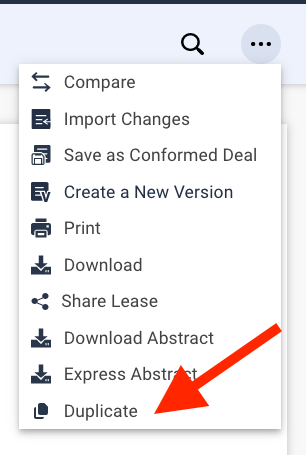
Enter the deal you wish to duplicate and from the Tools ( ) list in the top right hand corner of your screen, select Duplicate:
Step 2
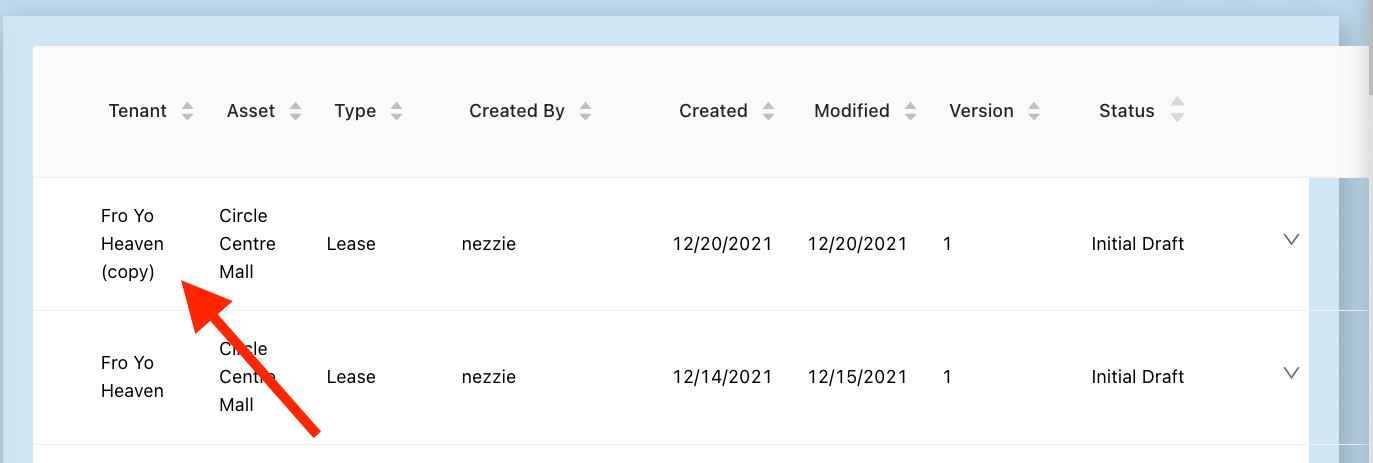
Return to the Dashboard and locate the newly created copy. It should be the latest document at the top of the Dashboard and share the same tenant name as the document duplicated except with the word "(copy)" at the end:
Step 3
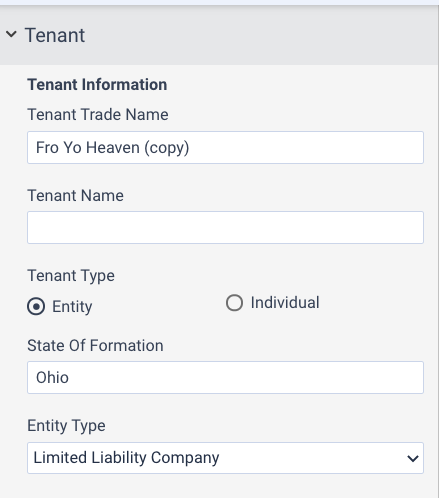
Enter the "copy" of the document and make any necessary changes or updates. This could include the tenant name (as shown below), any deal terms in the left-hand drafting tools, or any manual edits made throughout the document:
Tips and Notes:
- Any changes made to your base form using Form Manager or by LeasePilot from the time the original deal was created and the time the copy is created will not appear in the document copy.
- Document duplication can be used for any documents created in LeasePilot.
- This differs from our Conformed Deals feature in that you're not limited to creating a template by tenant name to be used for only that tenant for future deals but you can duplicate any deal to be used for any tenant.
Comments
0 comments
Please sign in to leave a comment.