Underneath "All Documents" on the dashboard you will see a column called "Status".
By default all documents created in LeasePilot start with a status of "Initial Draft"
If you click within the status column for a particular document you will be presented with the option to change the document status by clicking on any of the statuses that appear.
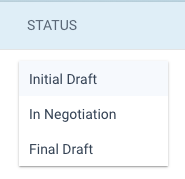
Within LeasePilot there are three primary statuses:
Initial Draft - This is the default status for newly created documents. This status is used to indicate that you are working on a first version of a document that does not currently have tenant requests incorporated into your document.
In Negotiation - Once you receive comments back from a tenant this status is used to indicate that you are currently working on a new version based off tenant comments. This status should be used for second and subsequent drafts.
Final Draft - Final draft status signals that a document will no longer be updated and that the document has been executed.
You can currently change statuses at any time from the dashboard.
Comments
0 comments
Please sign in to leave a comment.