The Dashboard is the first thing you will see when you log into LeasePilot. This is where you can browse all of the leases that you and your team has created in LeasePilot. A typical dashboard will look something more like this:
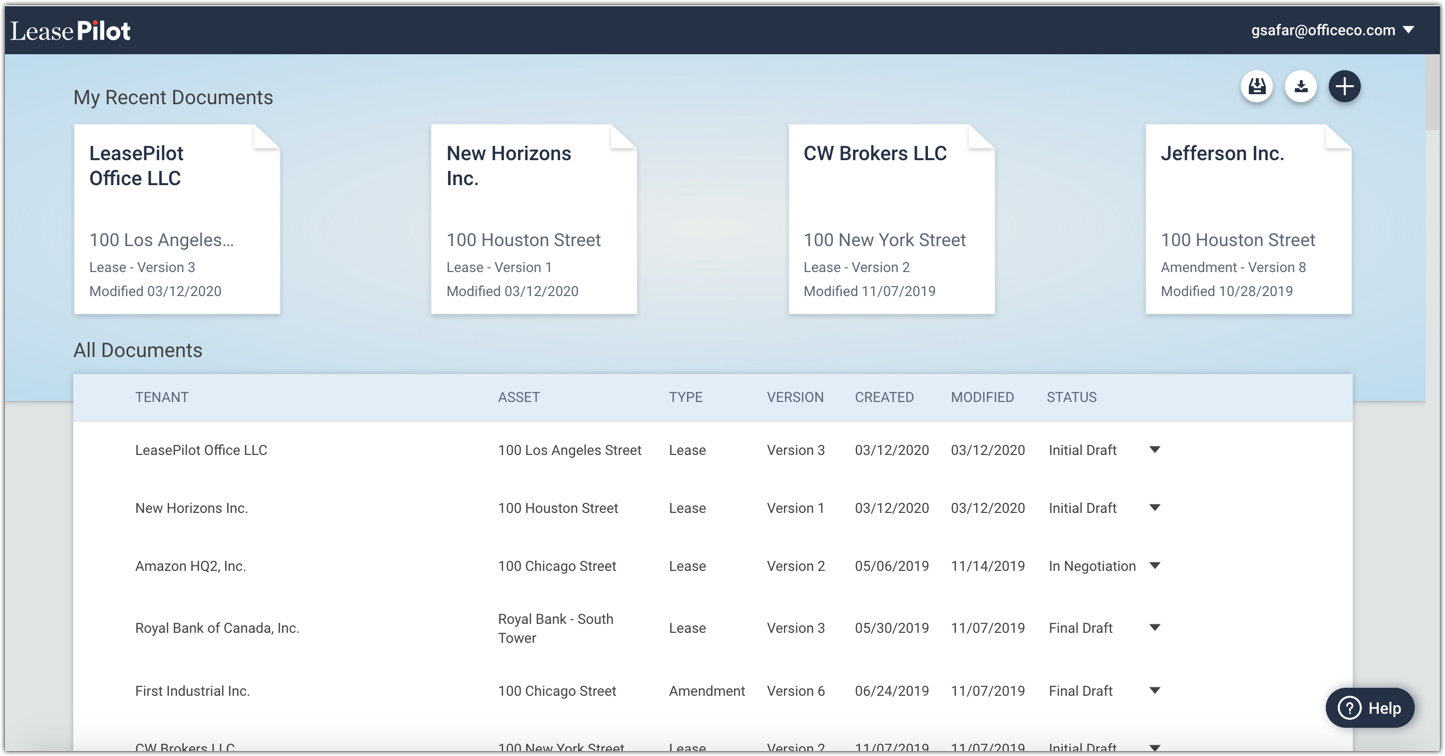
The My Recent Documents section displays the the last 4 documents that you modified. The documents displayed in this section will be different for each LeasePilot user in your organization.
The All Documents section is where you'll find a list of all the leasing documents you and your team has created in LeasePilot. The details you'll see for each document are as follows:
- Tenant Name
- Asset Name
- Document Type (e.g. Amendment, Lease, etc.)
- Document Version
- Created Date
- Last Modified Date
- Document Status (Initial Draft/In Negotiation/Final Draft)
Everything you can do from the Dashboard
In addition to viewing all the active LeasePilot documents within your organization and their status, you can also use the dashboard to:
- Create new documents
- Share documents via email
- Archive leases
- Download a blank form in MS Word format
- Change your password
- Access our help portal
- Contact our customer support team
Comments
0 comments
Please sign in to leave a comment.